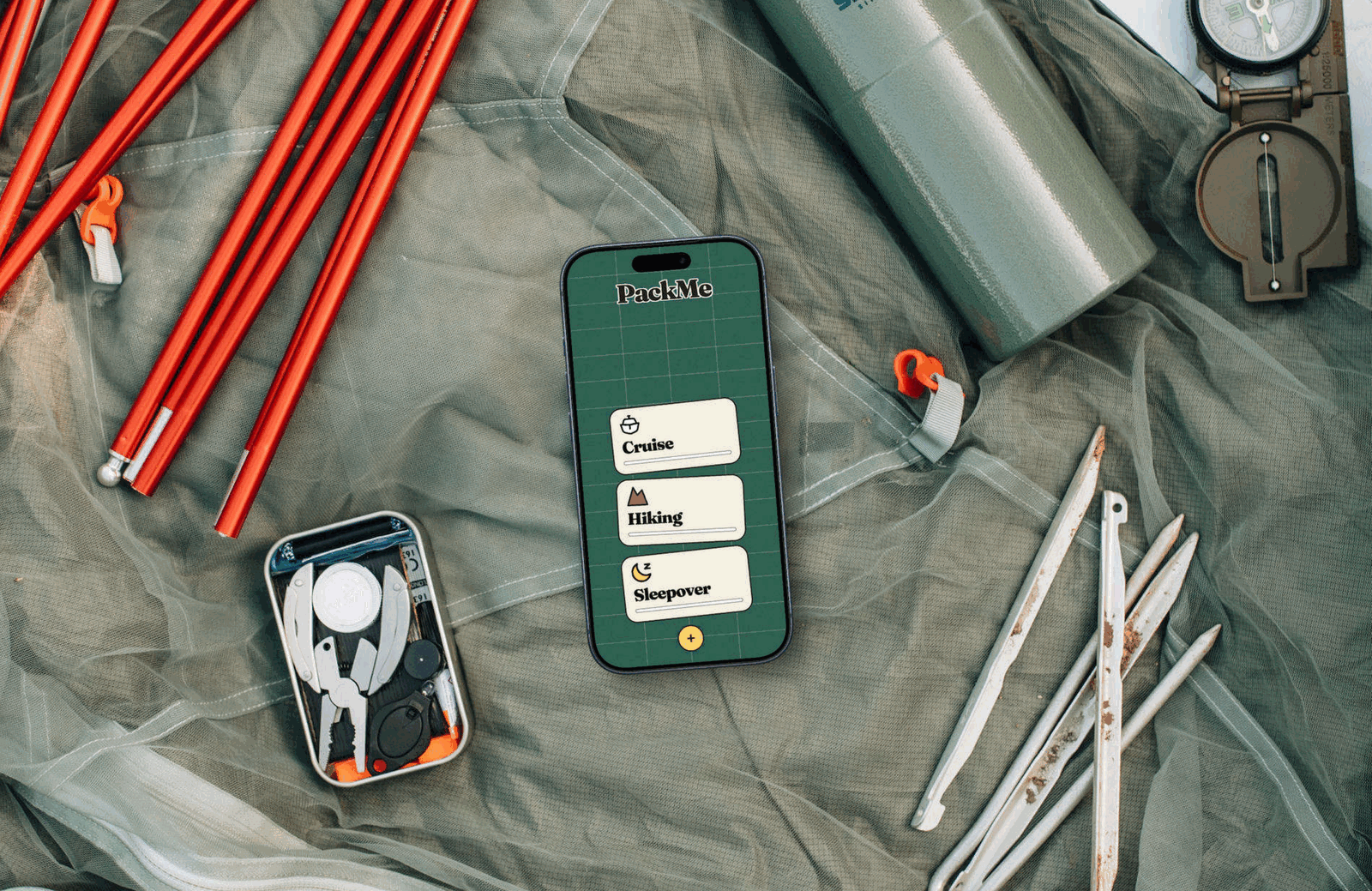
PackMe: A swipe-based packing app that turns packing into one decision at a time.
Packing lists get skimmed, so people forget items even when they use one.
Designed a one-item-at-a-time swipe flow and tested it with 5 participants.
Working prototype with categorized decks, deferred items, and motion/sound feedback.
Turning packing into one decision at a time
Packing lists are useful until they become easy to skim past.
PackMe presents one item at a time and asks the user to make a simple decision: pack it now or defer it.
Deferred items return to the deck until they are intentionally packed.
The interaction breaks packing into a series of small decisions.
Why do we still forget the same things?
According to Radical Storage, 42% of people pack by checking off a packing list, while 51% still end up forgetting something.
A checklist can contain every item you need, yet important items can still disappear inside a long list.
That raised the question behind PackMe:
What if packing required less scanning and more deliberate decisions?

Everyone else is improving the list
Existing packing apps mostly focused on smarter suggestions, weather data, categorization, and sharing.
PackMe takes a different approach.
Instead of asking:
How can we make the list better?
I asked:
How can we make each decision harder to skim past?
That question became the foundation of the product.
PackPoint
Weather-and-activity-based packing list generator
✅ Strengths: Weather-and destination-based suggestions; free and simple
❌ Weaknesses: Activity-based suggestions are generic and the interface feels dated; still a static list at heart
Packr
Multi-trip, multi-person packing list organizer
✅ Strengths: Good for multi-destination trips; family/group list support
❌ Weaknesses: Can feel visually cluttered on smaller screens
TripIt
Trip-tracking app with a built-in packing list feature
✅ Strengths: Bundled with itinerary/flight tracking, so it’s already part of many travelers’ workflow
❌ Weaknesses: Packing list is a secondary feature, not built around the packing decision itself
Notes App
The default option: a blank list with no built-in system.
✅ Strengths: Zero friction to start and fully customizable
❌ Weaknesses: No structure, no reminders, and the format itself is part of why items get missed
The bet: one card, one decision
PackMe changes the interaction model rather than adding more information.
Each item gets its own card and one immediate decision:
Pack it now or defer it.
A deferred item returns later, giving the user another chance to notice it. The user doesn’t need to remember which items they skipped because the system remembers for them.
📋 List Blindness
Long checklists get skimmed. Familiar items you use daily, like a charger or toothbrush, are the easiest to assume you’ve got, and the easiest to miss.
📱 Swipe to Decide
With one card on screen, there’s less to skim past. Showing one item at a time gives each item a clear moment of attention.
🧠 Choice Overload
A full packing list dumped on one screen, with up to 30, 40+ items, is overwhelming to look at, making it easy to get tired or to put it off.
📦 Categorization
Items are split into General, Clothes, Electronics, Trip-Specific, and Hygiene decks, so you’re never facing more than one focused stack at a time.
📊 No Sense of Progress
Without a way to check how much is left, it’s hard to tell if you’re nearly done or barely started.
📊 Progress Bars
Progress shows at both the category level (card) and item level (inside the sorter), so momentum is always visible.
⚫ No Middle Ground
Most checklists only have two states: checked or unchecked. There’s no way to say “not sure yet, come back to this.”
↩️ Skip = Defer
The skip mechanic drops the item back into the stack instead of discarding it. Uncertainty doesn’t mean the item disappears.

Sketching the flow, then testing it
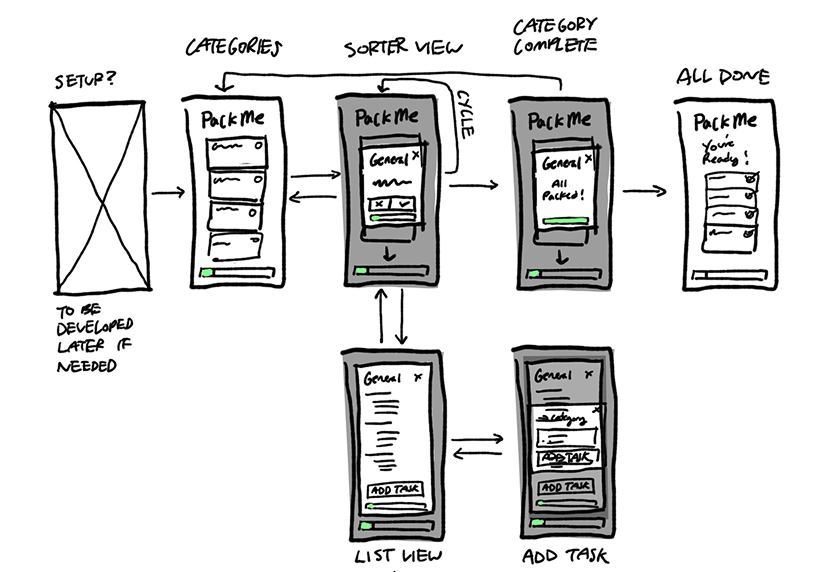
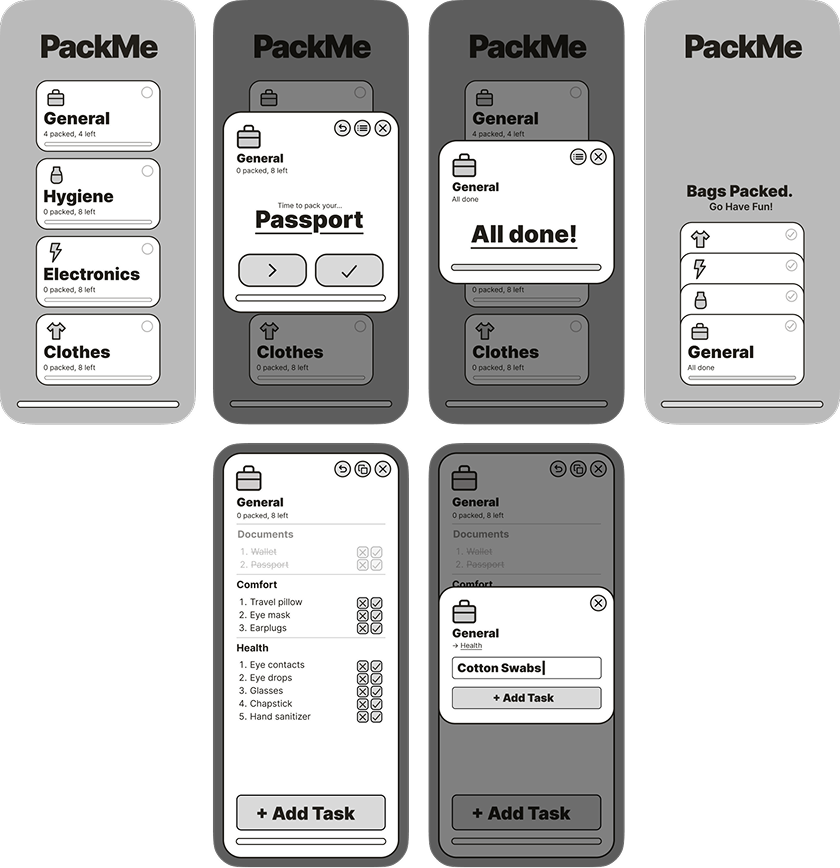
I sketched the one-card flow on paper, then turned it into mid-fidelity wireframes to put in front of participants.
Testing: the defer button wasn’t clear
I tested the mid-fidelity packing flow with 5 participants, covering the core packing and defer interaction, navigation, and information hierarchy.
2 of 5 participants misunderstood the defer button, the one control the whole model depends on. Testing also revealed smaller navigation and density issues.
I made six targeted fixes and carried them into the final interaction design and visual system.
2 of 5 testers weren’t sure what the defer icon meant at a glance.
Replaced it with a clearer double chevron icon, facing left.
Testers wanted more control over a task than just a title when creating one.
Added icon and image customization options for new tasks.
List actions like task adding, editing, or reordering took extra taps to reach.
Compressed list functions directly into each row and into the list view itself.
The “Add Trip” button pulled too much attention and distracted users.
Redesigned and repositioned it to sit less prominently.
Once inside a trip’s sorter view, testers had no way to back out.
Added a back button to trip sorters.
Inside a trip, the title was oversized and pushed content down.
Shrunk the title text and added a back button.
Making packing feel physical
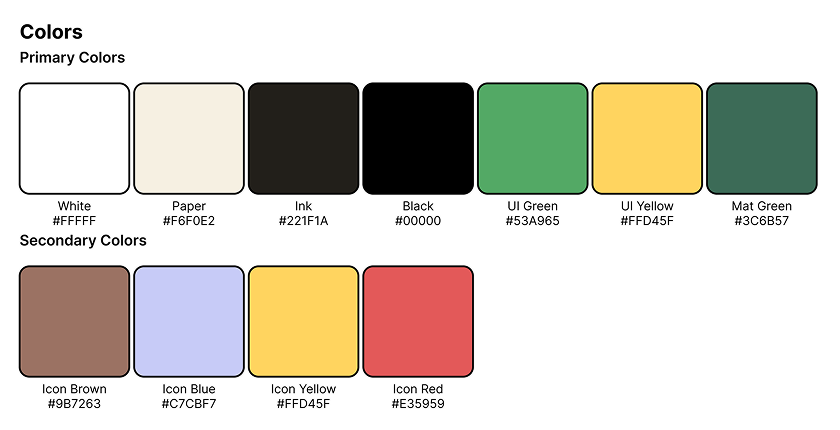
With the flow working, I designed a visual language that reinforces it through familiar physical objects.
Cutting mats and index cards inspired the surfaces and cards. Flipping or setting a card aside mirrors deciding what to pack now and what to deal with later.
The interface uses:
- Thick outlines
- Chunky corners
- Pill-shaped controls
- A tactile, game-like card treatment
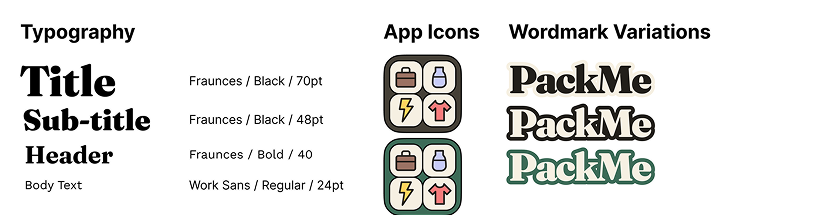
Typography pairs Fraunces with Work Sans, combining a distinctive display face with a neutral, highly readable UI font for item names and counters.
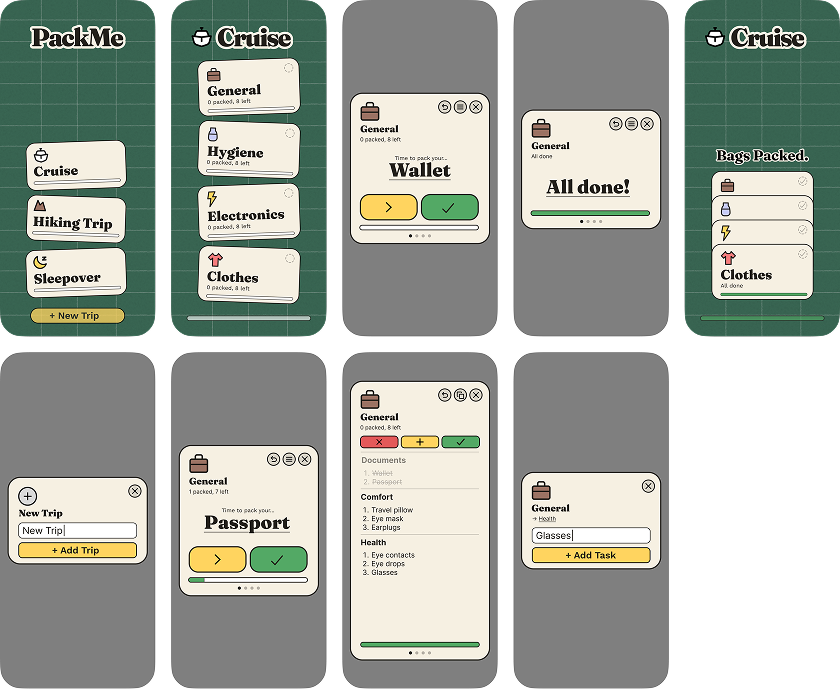
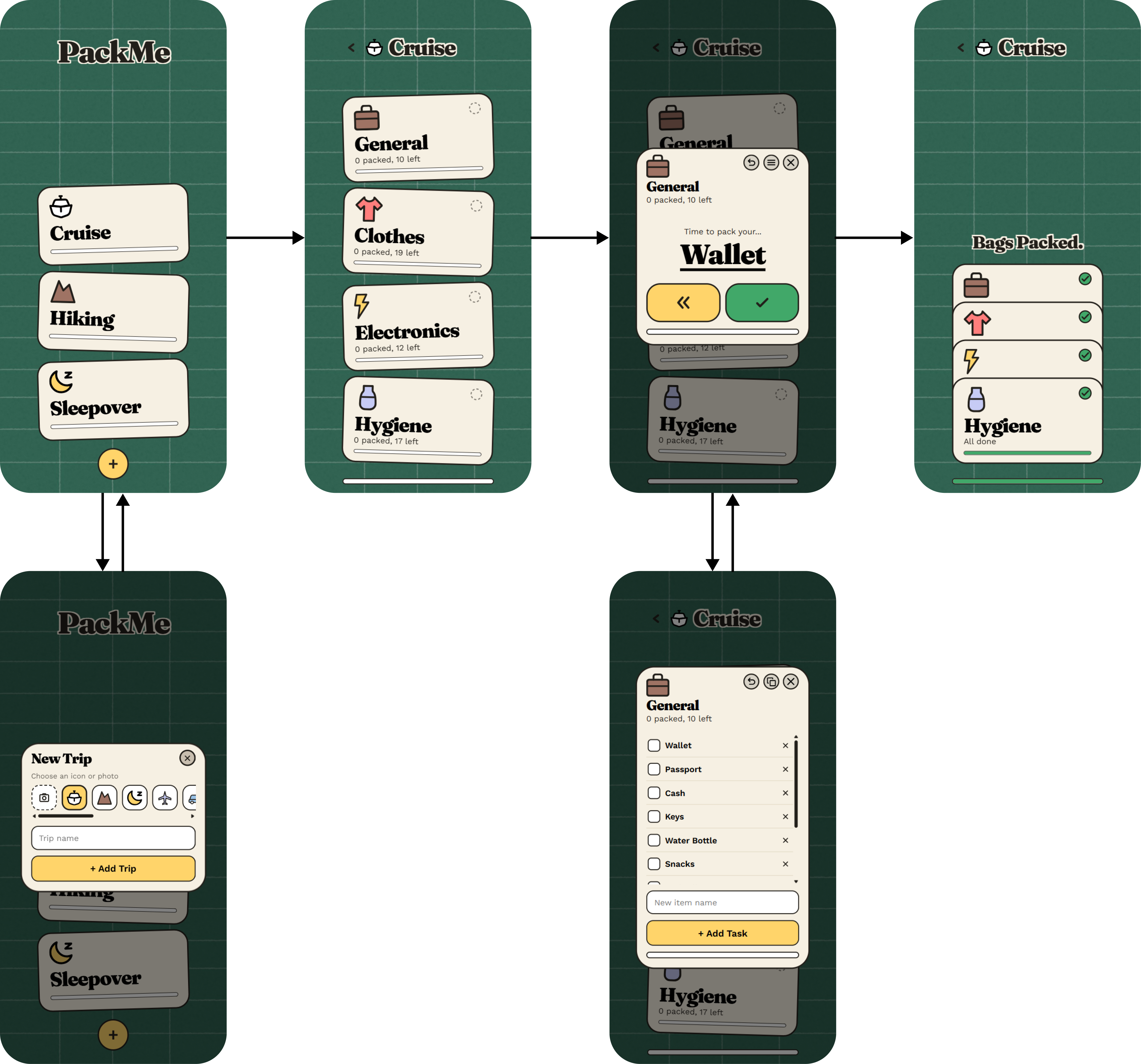
Final screens, before and after the testing fixes
The high-fidelity screens before and after the six fixes, with the physical card language carried across every step of a trip.
From mockup to working prototype
After addressing the testing issues, I used Claude Code with Figma’s MCP integration to turn the revised screens into a working prototype.
This let me test the updated defer flow, task customization, and navigation in a working prototype.
Motion and sound carry the tactile language into the prototype. Sound effects use assets from Balatro’s library via The Spriters Resource, while the interactions reinforce the physical card treatment.
Motion
🃏 Card interactions
Opening a category or dragging a card releases it into a pack or skip, instead of snapping back to center.
📦 Completion fold
Finishing a category or trip untilts the cards and settles them into a neat stack.
🎴 Unstack
Tapping a folded stack fans the cards back open.
Sound
👆 Default tap
Going back, packing, skipping, undoing, and deleting all share one plain tap, so nothing routine competes for attention.
🃏 Card interactions
Opening a category or dragging a card past the threshold plays the same card-fan sound, which sounds like a paper rustle.
🎉 Milestones
Starting a new trip, finishing a category, and finishing a trip each get their own distinct chime, with finishing a trip getting the grandest of the three.
What I learned
Sometimes the problem isn’t the list, but the entire interaction model.
PackMe started with a familiar problem: people overlook important items in long packing lists. I changed the task from scanning a list to making one decision at a time.
The result is a packing workflow built around deliberate attention rather than passive checklist completion.